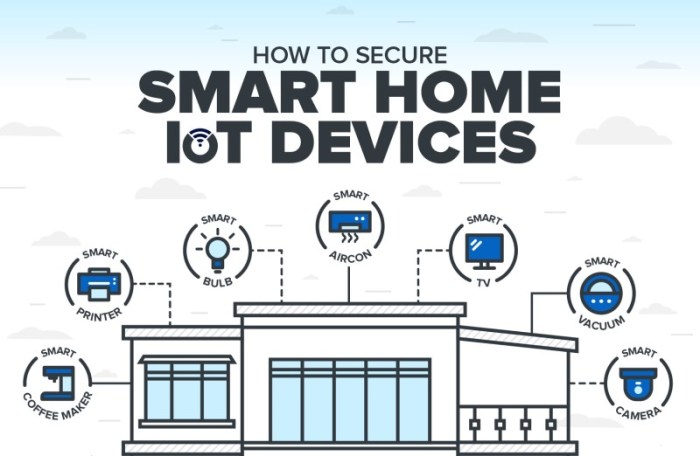
How to Secure Your Smart Home From Cyber Threats delves into the crucial steps needed to protect your smart home from potential cyber threats. As technology advances, so do the risks, making it essential to stay informed and proactive in safeguarding your devices.
This guide offers practical tips and insights to help you fortify your smart home against cyber vulnerabilities.
The following sections will cover key strategies and best practices for securing your smart home, ensuring peace of mind and enhanced digital security for you and your family.
Understanding Smart Home Cyber Threats
In today's digital age, smart homes are vulnerable to a variety of cyber threats that can jeopardize the security and privacy of residents. It is crucial to understand these threats to effectively protect your smart home devices.
Identifying Common Cyber Threats
- Malware: Malicious software designed to infiltrate and damage smart home devices.
- Phishing Attacks: Deceptive emails or messages used to trick users into revealing sensitive information.
- Denial of Service (DoS) Attacks: Overloading a smart home network to disrupt its normal functioning.
- Eavesdropping: Unauthorized individuals listening in on smart home conversations or activities.
How Cyber Threats Compromise Smart Home Devices
- Weak Passwords: Using easily guessable passwords can make it easier for hackers to gain access.
- Unsecured Networks: Lack of encryption or secure network settings can leave smart home devices vulnerable.
- Outdated Software: Failing to update device firmware can create security loopholes for cyber attackers.
Consequences of a Smart Home Security Breach
- Privacy Invasion: Hackers can access personal information or spy on residents through compromised devices.
- Physical Safety Risks: Malicious actors could tamper with smart home systems, posing a danger to occupants.
- Financial Loss: Cyber attacks on smart home devices can lead to financial theft or extortion.
Securing Smart Home Networks
Securing your smart home network is essential to protect your devices and personal information from cyber threats.
Tips for Securing Wi-Fi Networks in Smart Homes
- Change the default username and password of your Wi-Fi router to a strong, unique combination.
- Enable WPA3 encryption on your Wi-Fi network for enhanced security.
- Regularly update your router's firmware to patch any known vulnerabilities.
- Create a separate guest network for visitors to keep your main network secure.
Importance of Using Strong, Unique Passwords for Smart Devices
Using strong, unique passwords for each smart device in your home adds an extra layer of protection against unauthorized access.
Do not reuse passwords across multiple devices or accounts to prevent a single breach from compromising all your devices.
Role of Firewalls and Antivirus Software in Securing Smart Home Networks
Firewalls act as a barrier between your network and potential threats, monitoring and controlling incoming and outgoing traffic.
Antivirus software helps detect and remove malware from your devices, safeguarding your smart home network from cyber attacks.
Updating Smart Home Devices
Regularly updating smart home devices is crucial in maintaining the security of your smart home network. Firmware updates often include security patches that address vulnerabilities and protect your devices from cyber threats.
Step-by-step Guide to Updating Firmware on Smart Devices
- Check for Updates: Regularly check the manufacturer's website or the device's app for firmware updates.
- Download Firmware: Follow the manufacturer's instructions to download the latest firmware version for your device.
- Install Update: Connect your device to a stable Wi-Fi network and install the firmware update as per the provided guidelines.
- Restart Device: After updating the firmware, restart your smart home device to ensure the changes take effect.
Risks Associated with Using Outdated Software on Smart Home Devices
Outdated software on smart home devices can leave them vulnerable to cyber attacks and compromise the security of your network. Hackers can exploit known vulnerabilities in outdated firmware to gain access to your devices, steal personal information, or even take control of your smart home system.
It is essential to stay vigilant and regularly update all your smart devices to protect your home from potential security breaches.
Implementing Multi-factor Authentication
Multi-factor authentication (MFA) is a crucial security measure for smart home devices as it adds an extra layer of protection beyond just passwords. By requiring multiple forms of verification, such as a password, fingerprint, or security token, MFA significantly reduces the risk of unauthorized access to your smart home network.
Setting up Multi-factor Authentication on Smart Devices
- For Smart Locks: Enable MFA through the associated mobile app and choose a strong PIN or biometric method for additional verification.
- For Smart Cameras: Utilize MFA options available on the camera's app settings and consider using facial recognition or one-time passcodes for enhanced security.
- For Smart Thermostats: Enable MFA by logging into the device's web interface and selecting the multi-factor authentication option, combining a password with a separate authentication method like a verification code.
Benefits of Multi-factor Authentication
- Enhanced Security: MFA significantly reduces the risk of unauthorized access to your smart home devices, protecting your privacy and sensitive data.
- Prevents Account Takeover: By requiring multiple forms of verification, MFA makes it much harder for cybercriminals to compromise your smart home network.
- User Verification: MFA ensures that only authorized users can access and control smart devices, adding an extra layer of identity confirmation.
Securing Smart Home Cameras and Microphones
Smart home cameras and microphones can pose significant privacy risks if not properly secured. Hackers can potentially access these devices and spy on your activities, compromising your privacy and security.
Securing Smart Home Cameras
When it comes to securing smart home cameras, follow these guidelines:
- Change the default login credentials of your camera to unique, strong passwords.
- Regularly update the camera's firmware to patch any security vulnerabilities.
- Disable remote access to the camera when not needed to prevent unauthorized access.
- Enable encryption on the camera feed to ensure that it cannot be intercepted by hackers.
Securing Smart Home Microphones
Protect your smart home microphones with these security measures:
- Review the permissions granted to the microphone in the associated app and restrict unnecessary access.
- Keep the microphone firmware up to date to address any security flaws that could be exploited.
- Consider physically covering the microphone when not in use to prevent unauthorized audio recording.
Disabling Cameras and Microphones When Not in Use
It is crucial to disable smart home cameras and microphones when not in use to prevent potential privacy breaches. Always turn off these devices when you are not actively using them, especially in sensitive areas of your home.
Monitoring Smart Home Device Activity
Monitoring the activity of smart home devices is crucial in ensuring the security and privacy of your home. By keeping track of the behavior of these devices, you can detect any suspicious or unauthorized activities early on.
Recommendations for Using Smart Home Security Tools
- Utilize smart home security tools that provide real-time monitoring of your devices' activity.
- Set up alerts and notifications for any unusual behavior detected by the security tools.
- Regularly review the logs and reports generated by these tools to stay informed about the activity on your network.
Importance of Monitoring Device Activity
Monitoring device activity can help you detect potential security threats early, such as unauthorized access attempts or unusual data transfers. By keeping a close eye on the behavior of your smart home devices, you can take proactive measures to safeguard your network and personal information.
Ultimate Conclusion
In conclusion, safeguarding your smart home from cyber threats requires diligence and awareness. By implementing the recommendations Artikeld in this guide, you can significantly reduce the risk of security breaches and protect your privacy. Stay informed, stay vigilant, and enjoy the benefits of a secure and smart living environment.
Essential Questionnaire
How often should I update my smart home devices?
It is recommended to regularly update your smart home devices to ensure they have the latest security patches and features. Check for updates at least once a month or as soon as new updates are released by the manufacturer.
What is multi-factor authentication and why is it important for smart homes?
Multi-factor authentication adds an extra layer of security by requiring users to provide two or more forms of verification before accessing their devices. This significantly reduces the risk of unauthorized access to your smart home systems.
How can I secure my smart home cameras from hackers?
To secure your smart home cameras, ensure they are password-protected with a strong, unique password. Additionally, regularly update the camera firmware, disable remote access when not needed, and use a secure Wi-Fi network to prevent unauthorized access.